

A hotel can run IPTV, guest Wi-Fi, VoIP, and administrative systems through the same physical network.
That does not mean they should share the same logical network.
When these services are placed into one flat network, troubleshooting becomes harder and traffic from one service can affect another. For IPTV, that can mean unnecessary multicast traffic, congestion, or a harder-to-isolate fault when guests report video problems.
The practical solution is simple: share the physical infrastructure, but separate the services with VLANs.
Why IPTV Needs Its Own VLAN
In a hospitality network, IPTV traffic has a different job from guest internet or VoIP traffic. A dedicated IPTV VLAN creates a logical boundary around that service. For example:
- VLAN 10 — IPTV
- VLAN 20 — Guest Wi-Fi
- VLAN 30 — VoIP
- VLAN 40 — PMS/POS
- VLAN 50 — Network Administration
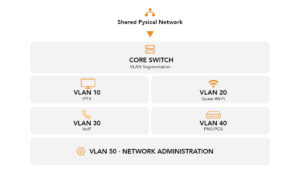
This does not require a separate physical network for every service. The same switches and cabling can carry multiple VLANs while keeping the traffic logically separated.
For IPTV, that separation is particularly important because multicast video can generate significant traffic across the network.
What Does VLAN Separation Actually Change?
Think of VLANs as traffic boundaries.
Without segmentation, different services can share the same Layer 2 network. With VLANs, each service has its own logical network and traffic can be controlled as it moves between them.
That gives the network three practical advantages:
- Traffic isolation– IPTV traffic is kept separate from guest internet, VoIP, and administrative traffic.
- Fault containment– A problem affecting one service is easier to isolate instead of troubleshooting one large flat network.
- Easier management– Network engineers can identify where a service belongs and verifies whether the correct VLAN is being carried through the network.
VLANs do not replace multicast controls such as IGMP Snooping. They work alongside them. VLANs define the traffic boundary; IGMP Snooping controls where multicast traffic is forwarded.
The VLAN Must Reach the Room
Creating VLAN 10 on the core switch is not enough.
The VLAN design has to continue through the network:
Core → Access Switch → Room Port → IPTV Endpoint
The room’s IPTV device should connect to the appropriate access port, while inter-switch links need to carry the VLANs required by the design.
For example, a typical hospitality network may use:
- Access portsfor room IPTV endpoints
- Trunk portsbetween network switches
- Hybrid configurationswhere multiple services share a physical connection
The important check is not simply “Does the switch support VLANs?”
It is:
“Is the IPTV VLAN correctly carried from the room to the core without mixing it with other services?”
For a stable hospitality IPTV deployment, physical network sharing is normal. Logical traffic separation is what keeps the services manageable.